Upsell Dashboard
Overview
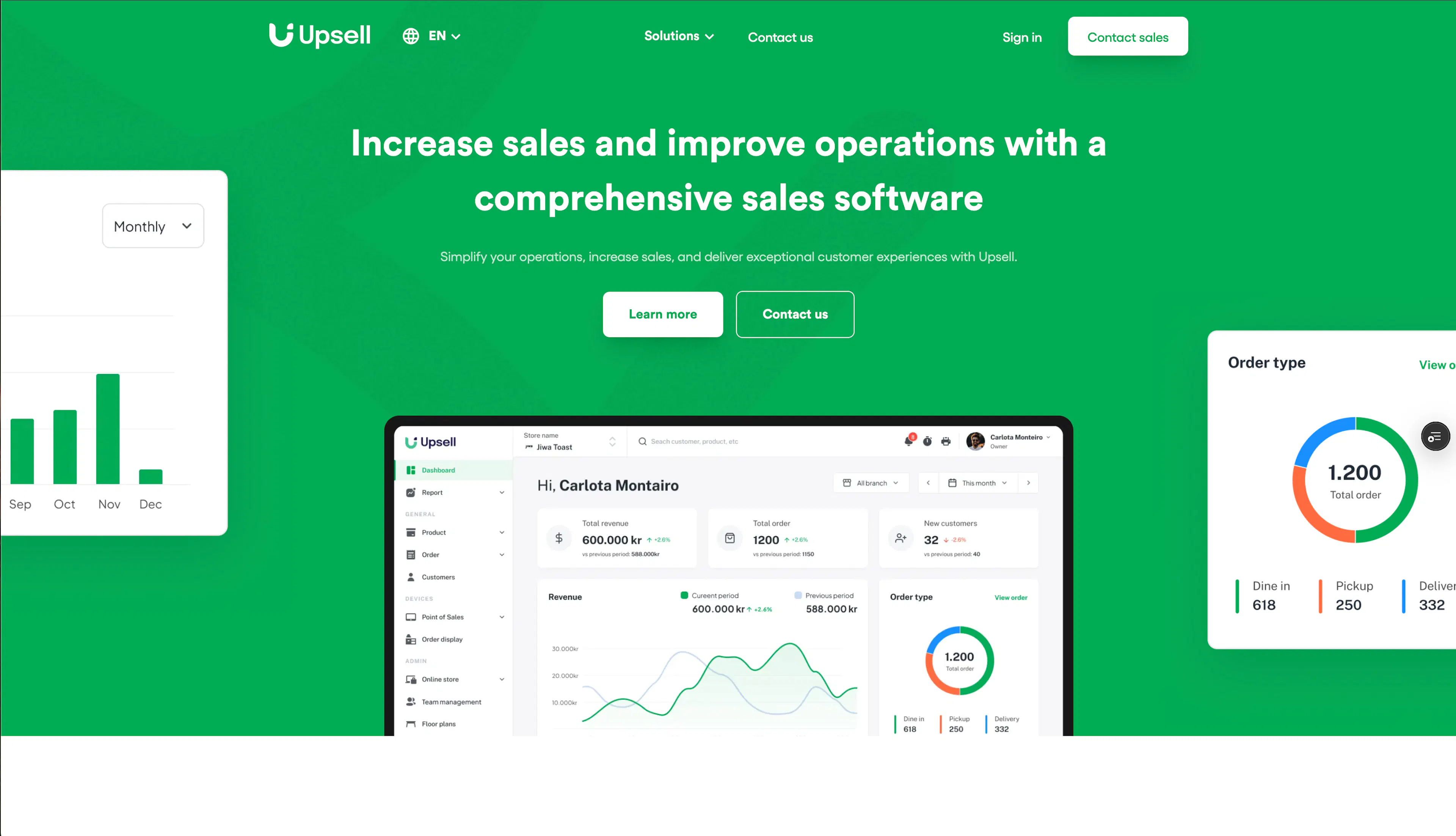
Upsell Dashboard (upsell-dashboard) is the merchant-facing administration and point-of-sale console for Upsell, an Icelandic restaurant upsell and sales platform. Restaurant owners and staff use it to manage their menu, process and track orders, run promotions and loyalty programs, configure table layouts, and operate kitchen display screens — all scoped to a chosen store through the store-picker entry point at upsell.is.
The dashboard is a Next.js 14 (Pages Router) + React 18 single-page application styled with Material UI v6. It is one package inside a large Nx monorepo that also hosts the platform's backend APIs (the legacy upsell-api Express service, the modern dashboard-api Cloudflare Worker, and a family of domain-specific workers such as orders-api, products-api, and promotions-api). The frontend reaches those services through a mix of Axios/REST and generated, type-safe Hono RPC clients.
Because the dashboard predates the platform's migration toward serverless Cloudflare Workers, it still reads and writes legacy MongoDB collections through the Express API, while newer features progressively move to PostgreSQL (Drizzle) behind domain workers. The sections below cover the dashboard's role in that wider platform, the monorepo layout, the MongoDB data model, and the author's personal contributions.
Tech Stack & Rationale
Layer | Technology | Why |
|---|---|---|
Frontend framework | Next.js 14 (Pages Router), React 18 | Server-rendered dashboard shell with per-store dynamic routes; Pages Router keeps the legacy Minimal UI template intact |
Language | TypeScript (strict) | Mandatory across the monorepo; typed Prismic-free REST/API payloads |
UI & styling | Material UI v6 (MUI), Emotion | Rich data-table, form, and date-picker primitives for a dense admin UI; Emotion enables the Minimal UI theming layer |
State management | Redux Toolkit + redux-persist, SWR, React Context | RTK for legacy entity slices; SWR for newer cached data fetching; Context for cross-cutting concerns (auth, API clients, print queue) |
Data fetching | Axios, SWR, Hono RPC clients (@upsell/dashboard-api-client) | Axios for the legacy REST API; generated type-safe clients for the dashboard-api worker |
Auth | PropelAuth | Hosted multi-tenant auth with orgs, roles, and access tokens wired through a React provider |
Feature flags | GrowthBook (legacy), Reflag | Progressive rollout and remote config; Reflag is the active replacement |
Backend APIs | Express (upsell-api), Cloudflare Workers + Hono (dashboard-api, domain workers) | Legacy REST monolith + modern domain-driven serverless layer |
Databases | MongoDB (Mongoose, legacy), PostgreSQL (Drizzle, new) | Existing merchant data lives in Mongo; new features target Postgres during an ongoing migration |
Observability | Sentry, Mixpanel, OpenTelemetry | Error tracking, product analytics, and distributed tracing |
Build & orchestration | Nx, pnpm | Monorepo task graph, affected builds, and deployment targets |
Architecture
The dashboard follows a store-scoped, multi-tenant request flow: after authentication, every page lives under a dynamic /[storeId] route, and all data reads/writes resolve against the selected store's organization (orgId).
The flow runs: Store picker (/ selects a store) → /[storeId] page (dynamic route) → API clients (Axios · Hono RPC · SWR) → Backend (Express · Cloudflare Workers) → Data (MongoDB · PostgreSQL). Authentication (PropelAuth) supplies the org and access token that scope every request.
- Store picker — the root / page lists the merchant's stores; selecting one navigates into a /[storeId] route and passes a redirect back from legacy URLs (handled by middleware.ts, which maps old /dashboard/* and /app/dashboard/* paths to the store picker).
- Authentication — the AuthProvider (PropelAuth) supplies the user session, the active organization (orgId), and an access token. usePropelAuthContext exposes currentOrgName and propelActiveOrgId.
- Store-scoped route — each page under /[storeId] (orders, restaurant, customers, inventory, loyalty, reports, POS, TV, settings, team management, and more) renders through the dashboard layout, which provides the sidebar/navbar shell and guards (guards/role components) against unauthorized access.
- Data access — new pages use the DashboardApiProvider context, which builds generated type-safe Hono RPC clients (customersClient, ordersClient, productsClient, etc.) bound to NEXT_PUBLIC_NEW_API_ENDPOINT. Legacy pages still use Redux Toolkit thunks + Axios against upsell-api, with SWR used for cache-friendly reads.
- Backend — the dashboard-api Cloudflare Worker orchestrates the domain workers (orders-api, products-api, promotions-api, store-api, restaurant-api, etc.) and never touches the database directly. The legacy upsell-api Express service remains in maintenance mode for MongoDB-backed reads/writes.
- Data — legacy collections live in MongoDB (Mongoose); new features are written to PostgreSQL through Drizzle ORM, with migrations tracked in the monorepo's migrations/ directory.
Folder Structure
monorepo/
├── apps/                    # Application projects
│   ├── upsell-dashboard/    # Admin dashboard (Next.js) — this project
│   ├── upsell-api/          # Legacy Express API (MongoDB)
│   ├── dashboard-api/       # Dashboard backend (Cloudflare Worker)
│   ├── orders-api/          # Order processing (Cloudflare Worker)
│   ├── products-api/        # Product management (Cloudflare Worker)
│   ├── restaurant-api/      # Restaurant data (Cloudflare Worker)
│   ├── store-api/           # Store management (Cloudflare Worker)
│   ├── pos-api/             # POS integration (Cloudflare Worker)
│   ├── promotions-api/      # Promotions engine (Cloudflare Worker)
│   ├── integrations-api/    # Third-party integrations (Cloudflare Worker)
│   ├── upsell-widget-web/   # Customer-facing ordering widget
│   └── ...                  # schedulers, TV, and utility services
├── libraries/               # Shared libraries
│   ├── upsell-kit/          # Core order/payment business logic
│   ├── dashboard-api/       # Hono RPC clients + router for dashboard-api
│   ├── shared/              # Shared utilities
│   ├── shared-db/           # Shared database helpers
│   └── roles/               # Role-based access control
├── customers/               # Customer-specific web apps (per-restaurant tenants)
├── migrations/              # Drizzle SQL migrations for PostgreSQL
└── scripts/ # Repo tooling and automation- apps/ — every deployable application. upsell-dashboard is the merchant console; the rest are the backend APIs (upsell-api legacy monolith plus the domain and orchestration workers) and customer-facing frontends.
- libraries/ — shareable TypeScript code: business logic (upsell-kit), the generated dashboard API client, shared DB helpers, and RBAC.
- customers/ — per-restaurant white-label web applications, one folder per tenant.
- migrations/ — Drizzle-generated SQL migrations for the PostgreSQL data layer.
- scripts/ — repository automation, deployment, and data-migration scripts.
The dashboard package itself organizes code under src/:
apps/upsell-dashboard/src/
├── pages/            # Next.js Pages Router (store picker, [storeId] routes, auth, errors)
├── sections/         # Page-specific components (orders, restaurant, customers, pos, ...)
├── components/       # Shared Minimal UI template components
├── layouts/          # dashboard / main / custom layout shells
├── redux/            # Redux Toolkit actions + reducers (legacy entity slices)
├── hooks/            # Custom hooks (useCurrentStoreId, useWaitingTime, usePrintQueue, ...)
├── contexts/         # React Context providers (Axios, DashboardApi, Printer, PrintQueue)
├── utils/            # Domain helpers (orders, payments, reports, printing, ...)
├── validations/      # Yup/Zod schemas for forms
├── auth/             # PropelAuth context and auth types
├── theme/            # MUI theme + component overrides (Minimal UI)
├── locales/          # i18next translations
└── routes/           # Typed route-path definitions (paths.ts)
Database Design
The dashboard reads and writes merchant data primarily through MongoDB (Mongoose), accessed via the legacy upsell-api Express service. MongoDB is the platform's original datastore; the monorepo guidance is to avoid creating new collections and to migrate existing ones to PostgreSQL (Drizzle) over time. The Mongoose models live in apps/upsell-api/src/models/v2/ and map roughly to the dashboard's feature areas:
Collection (model) | Purpose |
|---|---|
store, branch, restaurant, branch_setting | Multi-tenant store configuration, branches/locations, and restaurant settings |
order, pending_order, order_activity, order-notification | Order lifecycle, pending orders, activity log, and order-related notifications |
product, category, tag, variant, variation, extra, ingredient | Menu catalog: products, categories, tags, variants, extras, and ingredients |
deal, discount, coupon, discount_usage, coupon_usage | Promotions: deals, discounts, coupons, and their usage tracking |
customer, sales_customer, customer-campaign | Customer records, sales-customer linkage, and campaign membership |
table, tablegroup, floor | Table management: tables, table groups, and floor plans |
payment-gateway, payment-history, settlement, split-payment | Payment gateways, payment history, settlements, and split payments |
inventory, inventory_history, inventory_transfer | Inventory stock levels, history, and transfers |
giftcard | Gift card products and issued cards |
kiosk, kiosk_device, printer_device, counter, drawer | Hardware: kiosks, printers, counters, and cash drawers |
widget, widget_content, widget_design, widget_settings | Customer-facing ordering widget configuration |
role, accountant, admin, user | Role-based access control and staff/accountant accounts |
push-notification, otp, ticket, tax, setting | Notifications, one-time passwords, tickets, tax rules, and misc settings |
Newer data (for example, product variants and nutrition) is being moved to PostgreSQL via Drizzle, with the dashboard's src/@types/neon and src/hooks/neon folders reading those newer endpoints. Nutrition data is additionally served from FaunaDB (fauna/schema.fsl). This layered design means a single dashboard screen can transparently draw from Mongo (legacy), Postgres (new), and Fauna (nutrition) depending on which domain the data belongs to.
Impact & Results
- The merchant-facing console of the Upsell restaurant platform — one of the core apps in a monorepo that serves 16+ customer sites.
- In production at upsell.is, used by restaurant owners and staff to run menus, orders, promotions, and loyalty.
My Contributions
- I initiated the dashboard package in 2024 and fixed an early undefined-order-number bug on the kitchen display screen (KDS).
- I built the waiting-time configuration flow, adding a "default waiting time" setting and a "reset default waiting time" action end-to-end across the dashboard and API.
- I updated the dashboard's layout design, added an accordion component to the detail page, and fixed the location selector.
- I fixed the schedule picker's mobile behavior and added an "Apply" button for a scheduling flow.
References
[1] Upsell, "Upsell — Restaurant upsell and sales platform." [Online]. Available: https://upsell.is
[2] Vercel, "Next.js Documentation." [Online]. Available: https://nextjs.org/docs
[3] Nx, "Nx Workspace Documentation." [Online]. Available: https://nx.dev
[4] MUI, "Material UI — React UI component library." [Online]. Available: https://mui.com
[5] PropelAuth, "B2B Authentication and Authorization." [Online]. Available: https://www.propelauth.com
[6] MongoDB, "Mongoose — MongoDB object modeling for Node.js." [Online]. Available: https://mongoosejs.com
[7] Drizzle ORM, "Drizzle ORM Documentation." [Online]. Available: https://orm.drizzle.team
[8] Hono, "Hono — Ultrafast web framework for Cloudflare Workers." [Online]. Available: https://hono.dev
Comments
Leave a Comment
You must be signed in to comment
0 Comments
No comments yet. Be the first to comment!